Run your own CLI agents.
Claude Code, Codex, Gemini, and any model — on your own Mac, Windows, or Linux machines with real repo, file, and browser access. One command, no VPN.
For developers AI agent orchestration platform
Brief them in plain English. Specialized agents plan the work, use your real tools, and run on your own machines — with human approval gates and cost limits you control.
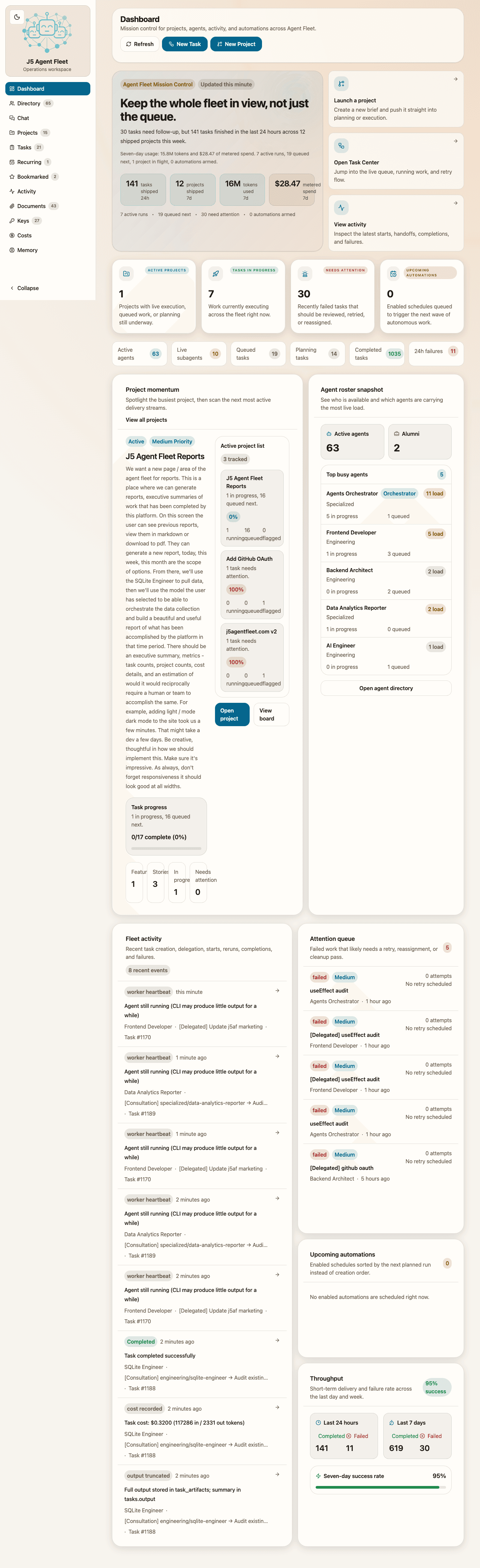
Claude Code, Codex, Gemini, and any model — on your own Mac, Windows, or Linux machines with real repo, file, and browser access. One command, no VPN.
For developersBrief a goal in plain English and let specialized agents plan and ship it in your real tools — with cost limits so spend never runs away from a lean team.
For startupsAgents that run on your infrastructure, act through approved tools, and leave a full audit trail — with cost attribution and approval gates your org controls.
For enterpriseA complete tour of J5 Agent Fleet — from briefing a project and delegating to specialized agents, to tracking execution, managing costs, and generating reports.
J5 Agent Fleet turns plain-English goals into structured execution — grounded in your real context and tools, with humans in the loop on anything that matters.
Attach repositories, files, and summaries from prior projects so the fleet plans from your real environment — not a clean-room chat.
Give each agent its own role, model, and operating instructions. Build custom specialists or hire proven roles from the community.
Put multiple employees — each with its own model, runner, and tools — around one topic. Seed the room with your repos, projects, research, and documents so they discuss the real thing. They take turns, build on each other, and stop when they align, hit the goal, or reach your time or budget cap.
Agents work in Gmail, Slack, GitHub, and 250+ apps through secure integrations — so they get things done, not just write about them.
Require human sign-off on risky actions, and cap spend with budgets and per-agent, per-project cost attribution. You stay in control.
Connect any Mac, Windows, or Linux machine in one command, or use our managed cloud runners. No port-forwarding, no VPN.
Every run reads like a finished job: an AI summary, the artifacts it produced, and a plain-language timeline. Day, week, and month reports write themselves — cost, throughput, and PDF-ready, from actual execution.
Wire agents into reusable graphs and run proven pipelines on demand or on a schedule.
Send agents to do cited, multi-source deep research and return a structured brief.
Agents remember decisions and context across projects, so you stop re-explaining.
Brief work, get updates, and approve sensitive actions over Telegram or email.
Hire proven specialist roles in one click, or publish your own for the team.
Bring Claude, GPT, Gemini, or a local model — pick the right one per agent.
The workflow is designed to feel operational from end to end: set the objective, let the fleet shape the work, consult the live plan, then track execution and share what moved forward without rebuilding the story by hand.
Create a project from a plain-English brief, then add the repositories, attachments, and prior-project context that give the fleet enough information to plan work like a capable operator, not a blank chatbot.

A project begins with the outcome, supporting repositories, uploaded files, and optional context from prior work so planning starts grounded in the real environment.
J5 Agent Fleet breaks the project into a usable execution model: features, stories, tasks, dependencies, and specialist assignments. Instead of manually orchestrating every step, you get a plan that is ready to run.

The platform decomposes the work into an execution tree that makes dependencies, planning state, and scope visible before agents begin.

Project consultation happens against the current brief, tasks, and outputs, so teams can ask questions without reconstructing context in a separate thread.
Launch work across agents, follow progress on the board or timeline, reuse bookmarked or recurring work where it fits, generate reports when you need a concise update, and drill into task detail when needed. You stay in control while the platform handles coordination at a scale that is hard to manage by hand.

Board-level visibility makes it clear what is running, what is blocked, and where the fleet needs a human decision.

The timeline shows scheduled starts, active run windows, and completed milestones grouped by feature or agent, so teams can plan work instead of reacting to it.

When you need detail, task-level history and execution context make every delegated step inspectable instead of opaque.
J5 Agent Fleet does not treat spend as a back-office afterthought. Teams can review budgets, attribute usage by agent/model/project, and keep AI economics visible in the same workspace where work is planned, delegated, and reviewed.
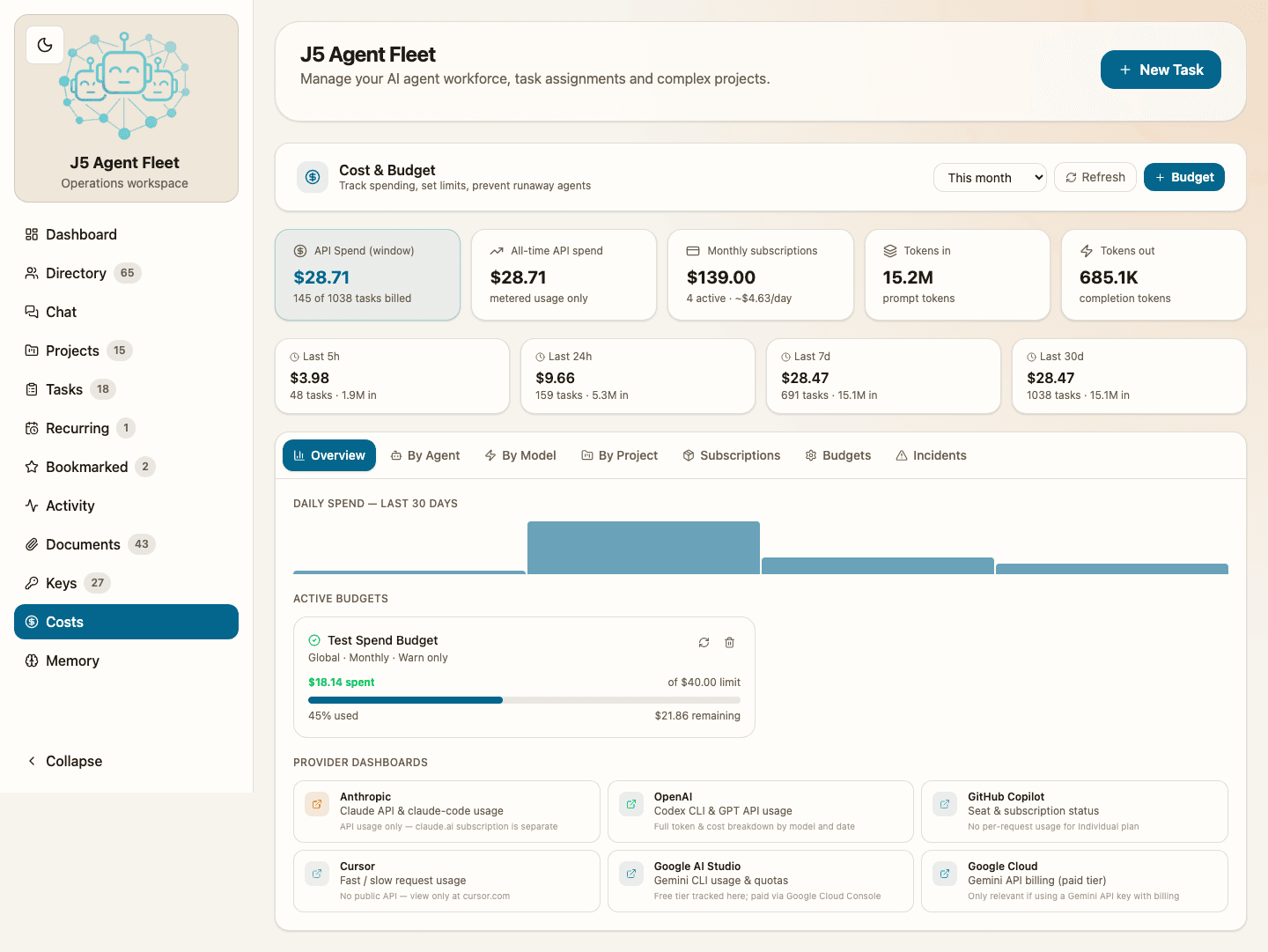
Create budget guardrails at the right scope, review current usage, and see remaining headroom in plain language instead of hunting through billing tools.
Switch between operational views to understand which specialists, models, and projects are driving cost so finance and engineering can act on the same data.
Daily spend trends, rolling windows, and active budget status keep economics visible while the fleet is running, not after the invoice lands.
FAQ
The questions below cover the core operating model: how J5 differs from generic assistants, how teams keep consultation, scheduling, reporting, reusable workflows, and cost visible, and what governance looks like as autonomous work scales.
J5 Agent Fleet is an operations workspace for coordinating specialized AI agents across real projects. It helps teams turn goals into structured execution with planning, delegation, live tracking, reusable workflows, and traceable outcomes.
A single assistant can help with one conversation at a time. J5 Agent Fleet is designed for coordinated execution across multiple agents, tasks, and workflows, with project structure, context management, reusable task patterns, and operational visibility built in.
Yes. J5 Agent Fleet is built for supervised autonomy. You can review plans, inspect task detail, monitor progress, pause or resume execution, and use consultation checkpoints where humans review work before it advances.
It is built for technical founders, engineering leaders, product teams, and AI-native operators who want to scale execution across complex work without losing visibility or control.
Yes. Project chat is seeded with the live brief, task descriptions, and task outputs from the current plan. That makes it easier to ask about risks, shipped work, or next steps inside the project instead of starting a fresh chat thread.
Yes. Teams can expand the fleet by creating their own specialists with a role, category, model, and operating instructions that fit the work they actually need to run.
Yes. J5 supports bookmarked tasks and recurring work so teams can preserve useful task patterns, rerun repeatable jobs, and keep that work visible in the same operating views as one-off execution.
Yes. Tasks can run immediately or at a scheduled date and time. Scheduled work stays visible in the same operating views as active work, which makes it easier to plan batch runs and keep humans aligned before execution starts.
Yes. J5 can generate day, week, and month reports from live platform activity, with concise markdown output for docs or slides and PDF-ready handoff when you need a polished recap.
The project timeline visualizes tasks on a Gantt-style view. Teams can group by feature to follow delivery milestones or by assigned agent to inspect workload, with scheduled starts, run windows, and completion points visible in one place.
Optionally, yes. For projects with a valid local workspace, J5 can maintain project-scoped QMD knowledge and show configuration status directly in the product. It is an operational aid for grounded project context, not a claim of universal memory.
The costs workspace gives teams rolling spend visibility, budget policies, and hard-stop guardrails for new work. You can see spend before it compounds and intervene with clear operational context instead of reacting after the billing cycle closes.
Yes. J5 surfaces spend and usage across multiple views so teams can inspect economics by task history, agent, model, and project. That makes it easier to spot where paid usage is concentrating and adjust operating choices before costs drift.
J5 keeps planning context, task history, outputs, and operational activity attached to the work. That gives teams a concrete trail for reviews, compliance conversations, and post-mortems instead of relying on scattered chat logs.
Teams typically start with one real project, connect the relevant repositories and context, and let J5 decompose the work into an operational plan. From there, they can expand the roster with specialized agents while keeping humans in the review loop.
Autonomous systems only perform well when they understand the work environment. J5 Agent Fleet lets teams reuse prior project context, connect repositories, preserve decisions, maintain project-scoped knowledge when needed, and chat against the live plan so agents can act with better judgment and less repetition.
Approval gates are human checkpoints that block agent execution until a team member explicitly signs off. They are useful before high-risk actions, external-facing changes, spend-heavy tasks, or any step where a human decision is genuinely required. Gates can be configured by checkpoint type, risk level, or task type, and the platform keeps a full audit trail of who approved what and when.
Yes. The agent runner daemon lets you connect any Mac, Windows, or Linux machine as a local execution node. Mac and Windows users can download the desktop app from Settings → Runners and sign in; the app registers the daemon automatically. Linux, headless, CI, and advanced manual installs can still use one-time setup tokens and CLI commands. Agents then run with full access to your local repositories, CLI tools, and environment.
J5 Agent Fleet offers a free Trial to get started, a Free tier with a monthly task allowance, a Pro tier for individual power users, and a Team tier for collaborative workspaces. See the Pricing page for current limits. Paid plans are billed through Stripe and can be managed from Settings → Billing at any time.
Yes. The Free tier includes a monthly task allowance so you can run real work without a credit card. When you reach the limit you can upgrade to Pro or Team from Settings → Billing. Trial accounts also get an extended window to explore the full feature set before choosing a plan.
J5 Agent Fleet is in early access. Join the waitlist and we’ll reach out to discuss how it fits your team’s work.